
Database Management
Impala – Query Language Basics
Impala Data types
The following table describes the Impala data types.
| Sr.No | Data Type & Description |
| 1 | BIGINT This datatype stores numerical values and the range of this data type is -9223372036854775808 to 9223372036854775807. This datatype is used in create table and alter table statements. |
| 2 | BOOLEAN This data type stores only true or false values and it is used in the column definition of create table statement. |
| 3 | CHAR This data type is a fixed length storage, it is padded with spaces, you can store up to the maximum length of 255. |
| 4 | DECIMAL This data type is used to store decimal values and it is used in create table and alter table statements. |
| 5 | DOUBLE This data type is used to store the floating point values in the range of positive or negative 4.94065645841246544e-324d -1.79769313486231570e+308. |
| 6 | FLOAT This data type is used to store single precision floating value datatypes in the range of positive or negative 1.40129846432481707e-45 .. 3.40282346638528860e+38. |
| 7 | INT This data type is used to store 4-byte integer up to the range of -2147483648 to 2147483647. |
| 8 | SMALLINT This data type is used to store 2-byte integer up to the range of -32768 to 32767. |
| 9 | STRING This is used to store string values. |
| 10 | TIMESTAMP This data type is used to represent a point in a time. |
| 11 | TINYINT This data type is used to store 1-byte integer value up to the range of -128 to 127. |
| 12 | VARCHAR This data type is used to store variable length character up to the maximum length 65,535. |
| 13 | ARRAY This is a complex data type and it is used to store variable number of ordered elements. |
| 14 | Map This is a complex data type and it is used to store variable number of key-value pairs. |
| 15 | Struct This is a complex data type and used to represent multiple fields of a single item. |
Comments in Impala
Comments in Impala are similar to those in SQL.In general we have two types of comments in programming languages namely Single-line Comments and Multiline Comments.
Single-line comments − Every single line that is followed by “—” is considered as a comment in Impala. Following is an example of a single-line comments in Impala.
-- Hello welcome to tutorials point.
Multiline comments − All the lines between /* and */ are considered as multiline comments in Impala. Following is an example of a multiline comments in Impala.
/*
Hi this is an example
Of multiline comments in Impala
*/
Impala – Create a Database
In Impala, a database is a construct which holds related tables, views, and functions within their namespaces. It is represented as a directory tree in HDFS; it contains tables partitions, and data files. This chapter explains how to create a database in Impala.
CREATE DATABASE Statement
The CREATE DATABASE Statement is used to create a new database in Impala.
Syntax
Following is the syntax of the CREATE DATABASE Statement.
CREATE DATABASE IF NOT EXISTS database_name;
Here, IF NOT EXISTS is an optional clause. If we use this clause, a database with the given name is created, only if there is no existing database with the same name.
Example
Following is an example of the create database statement. In this example, we have created a database with the name my_database.
[quickstart.cloudera:21000] > CREATE DATABASE IF NOT EXISTS my_database;
On executing the above query in cloudera impala-shell, you will get the following output.
Query: create DATABASE my_database
Fetched 0 row(s) in 0.21s
Verification
The SHOW DATABASES query gives the list of the databases in Impala, therefore you can verify whether the database is created, using the SHOW DATABASES statement. Here you can observe the newly created database my_db in the list.
[quickstart.cloudera:21000] > show databases;
Query: show databases |
Hdfs Path
In order to create a database in HDFS file system, you need to specify the location where the database is to be created.
CREATE DATABASE IF NOT EXISTS database_name LOCATION hdfs_path;
Creating a Database using Hue Browser
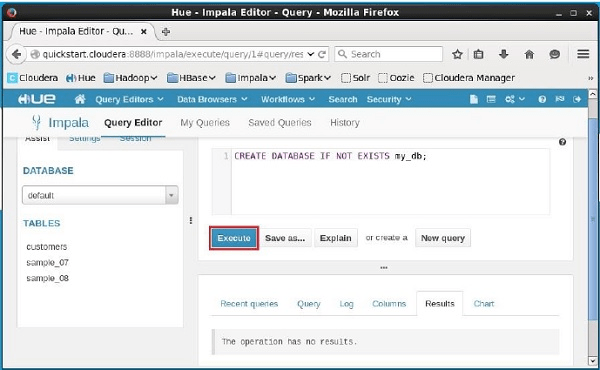
Open Impala Query editor and type the CREATE DATABASE statement in it. Thereafter, click the execute button as shown in the following screenshot.
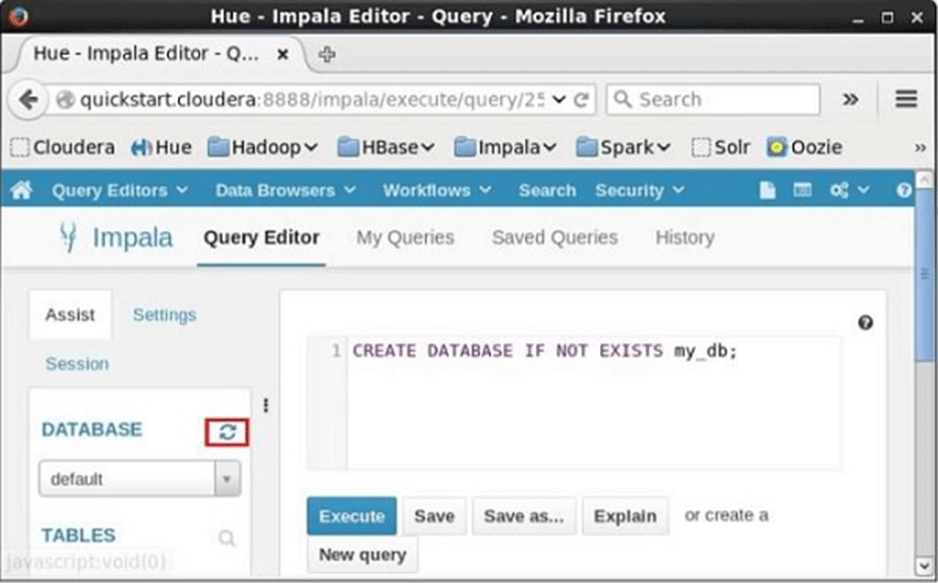
After executing the query, gently move the curser to the top of the dropdown menu and you will find a refresh symbol. If you click on the refresh symbol, the list of databases will be refreshed and the recent changes are applied to it.
Verification
Click the drop-down box under the heading DATABASE on the left-hand side of the editor. There you can see a list of databases in the system. Here you can observe the newly created database my_db as shown below.
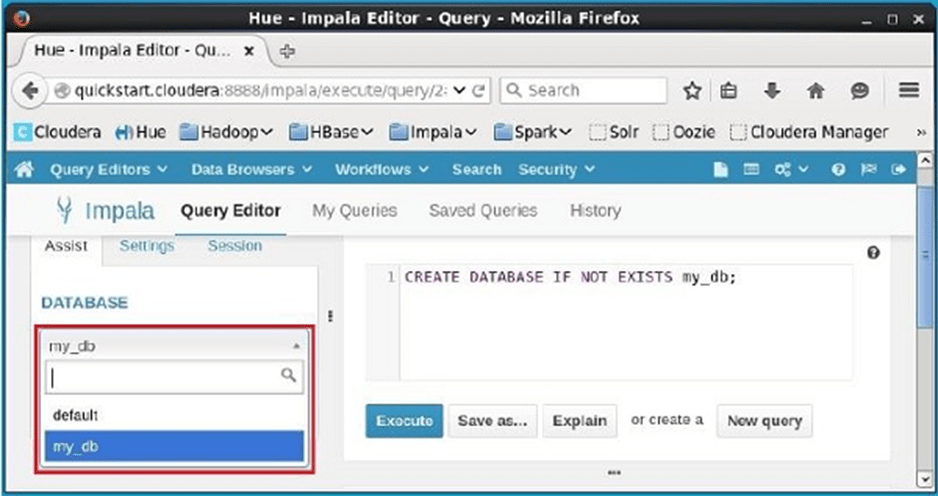
If you observe carefully, you can see only one database, i.e., my_db in the list along with the default database.